Chats
Your chats with Najimi, your circles and your DMs in one list, live, with calls, polls, photos, voice and the agent's cards.
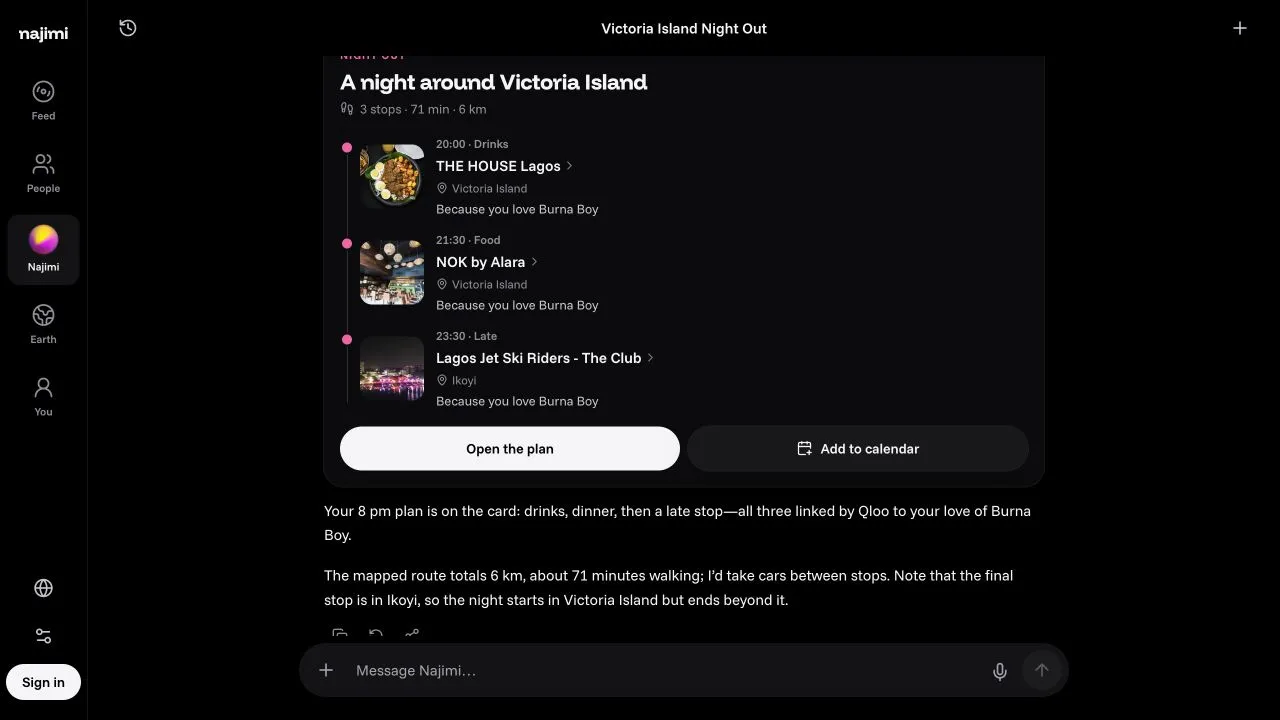
Every conversation is a room: your own chat with Najimi, a circle, or a DM. They all work the same way and update live for everyone in them.
The list
Open Chats from the history button at the top of any chat.
- Tabs: All, Najimi, Circles, People.
- Pinned rooms sit in a band of big faces at the top.
- Unread counts, and rows grouped by Today, This week and Earlier.
- Search by a chat's title, a circle's name or a person.
- A ring on a face means that person has a story up.
- Each row's menu: pin, and delete (your Najimi chats) or leave (circles and DMs). Leaving a circle or DM you started deletes it for everyone.
Writing
The composer is one row: +, your message, the mic, and send. In a circle or DM, type @ to pick Najimi or anyone in the room from a short list.
- + adds up to four photos (from your library or the camera) and, in circles and DMs, starts a poll.
- The mic dictates in your language and fills in the box; nothing sends until you tap send.
- While Najimi answers, send becomes stop. What it already said stays.
Najimi in a room
In your own chat Najimi answers every message. In a circle or DM, call it: @najimi find us a spot tonight, or start with "Najimi…". An empty circle offers three: a spot tonight, a film for all of us, music for all of us.
Its answers arrive as cards: picks you can open, a group fit with every member's face and fit, a night plan with its route, hotels with prices, a game, a poll, a call or a post waiting for your yes. Above the answer, a short run shows its Qloo lookups, web searches and questions as steps (qloo.insights · place · Lagos → 5). Under the latest answer: Copy, Try again and Share this chat. See The agent.
Calls
Tap the phone at the top of a circle or DM to start a voice call. It rings while you wait. Everyone else in it gets a push, a ringing banner on whatever screen they're on (Join or Not now) and a started a call card in the chat; only members can get in.
The call is one dark screen: everyone's face, with a ring while they speak, and round buttons with their names under them: Mute, Najimi, Invite (circles: shares the circle's invite link) and End. When the last person leaves, the call ends for good, there and then. If your browser holds the sound back, tap Tap to hear; if the line drops, Rejoin.
Bring Najimi and it joins as its orb: "Hi, I'm Najimi. I'm listening; say my name when you want me." It hears each person separately and keeps a transcript. With just you and Najimi in the call, it answers everything you say; with more people, it stays quiet until someone says its name: "Najimi, find us a spot tonight". Then it says One sec., posts what you asked in the chat as your message, answers there the usual way (cards and all) and says the first line or two out loud. Each question counts as one of the asker's turns for the day.
When everyone has left, the card turns into Call ended with how long it ran and, if Najimi was in it, a short summary of what was asked and decided.
Polls
Anyone in a circle or DM can start one (2 to 4 choices), and so can Najimi when the room can't decide; its choices carry the real artwork and open the thing. Everyone gets one vote and can change it, and the bars move live. Ask Najimi "what won?" and it reads the votes.
Photos
Photos you share are re-encoded when they arrive, which strips their location and camera data, and they're stored privately. Najimi sees them and answers like a friend would; it only restyles one when you ask (see Real-world actions).
Your own chat with Najimi
Tap the title to rename it. A new chat is titled for you after the first answer, in your language. Older messages load as you scroll up.